
Free TI 84 Calculator online For Graphing & Math
Free to use • No download • Works in browser
Sometimes you just need a quick graphing calculator to solve equations, check answers, or visualize functions without carrying a physical device. The TI 84 calculator online gives students a simple way to practice algebra, trigonometry, calculus, and statistics directly in a browser. The layout feels similar to a real TI-84 calculator, which makes it easy to use during homework, classroom activities, and exam preparation. You can graph equations, explore functions, and use scientific tools without installing additional software. Open the TI 84 calculator online and start solving math problems from any device.
What is TI 84 Calculator online
This TI 84 calculator online is a powerful graphing calculator developed for high school and college students. This calculator makes it easy for students to graph functions, solve equations, analyze data, solve algebra, calculus, statistics, and physics problems. Its simple interface, Stability, and strong performance have made the TI-84 the most trusted graphing calculator for students, teachers, and professionals. This calculator gives all the functionality of a physical TI-84 Plus CE calculator directly in your browser.
How to Use the TI 84 Calculator Online
Using the online TI-84 Plus calculator is simple and beginner-friendly. Just open our home page and start using the Calculator. You don’t need to sign up or log in. The screen is easy to use and works exactly like a real TI-84 Plus CE calculator. Just follow the step-by-step guide:
Step-by-Step Guide to Use the Calculator Online:
- Open the Emulator – Visit the ti84online.com page in your browser.
- Enter Numbers & Equations – Use the on-screen keypad to type numbers, operations (+, –, ×, ÷), and functions like sin, cos, log, or √.
- Graph a Function – Press the Y= button, enter your equation (e.g., Y1 = 2X + 3), then press GRAPH to visualize it.
- Use TRACE – Press TRACE to move along the curve and see exact coordinate points.
- Zoom In/Out – Press ZOOM and choose options like Zoom In, Zoom Out, or Window to adjust the view.
- Find Intersections or Points – Use 2nd → CALC menu to find intersections, maximums, minimums, or zeros.
- Change Modes – Press MODE to switch between Degree/Radian, Float/Scientific notation, or other settings.
- Clear Screen – Press CLEAR or use the reset options when needed.
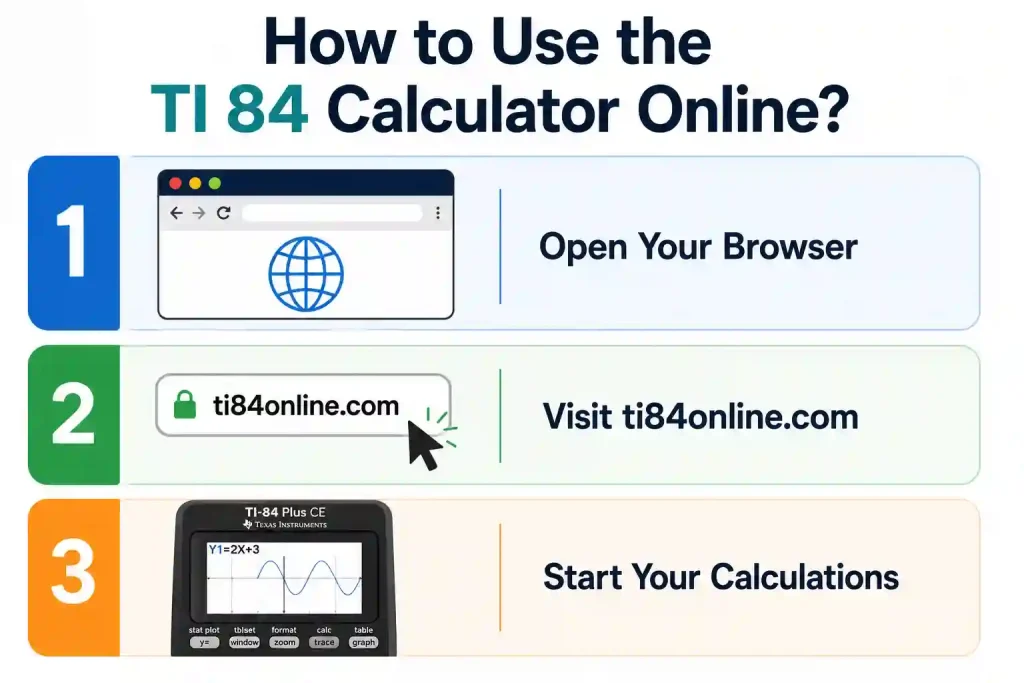
This online TI-84 emulator works smoothly on phones, tablets, and computers, making it perfect for homework, tests, and practice anytime. Students who want to explore more calculator functions can read the complete TI-84 guide here.
Example Problems You Can Solve With the TI-84 Step-by-Step
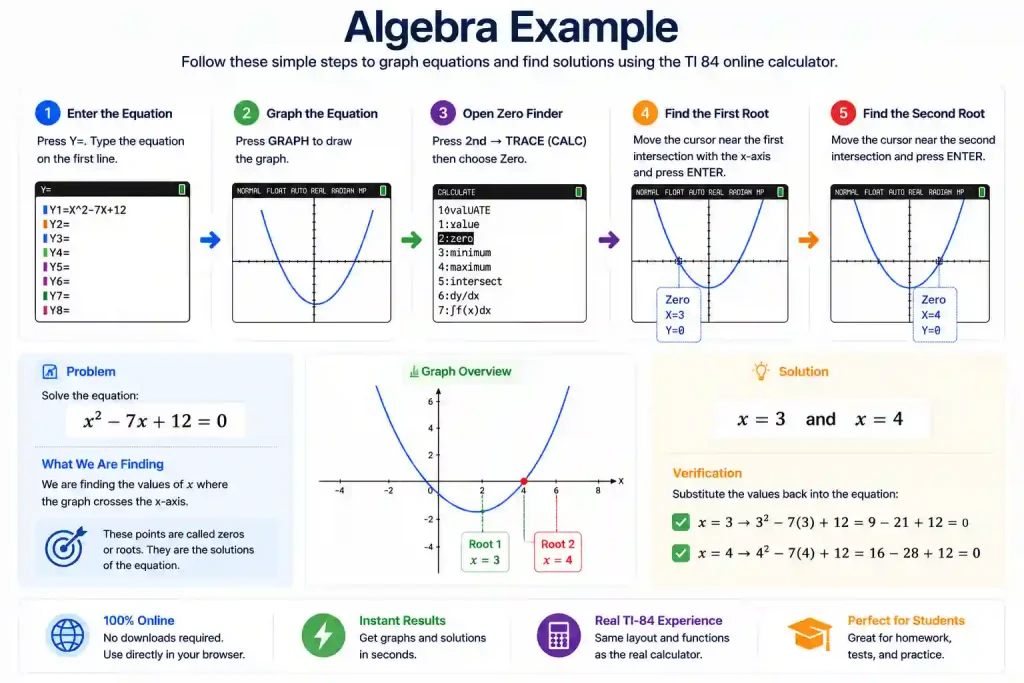
Example 1: Algebra Example
Problem:
x² − 7x + 12 = 0
Steps on TI-84:
- Press Y=
- Enter: X² − 7X + 12
- Press GRAPH
- Press 2nd → TRACE → Zero
- Move the cursor near the first root and press ENTER
- Repeat for the second root
Result:
x = 3 and x = 4
Example 2: Graph a Function
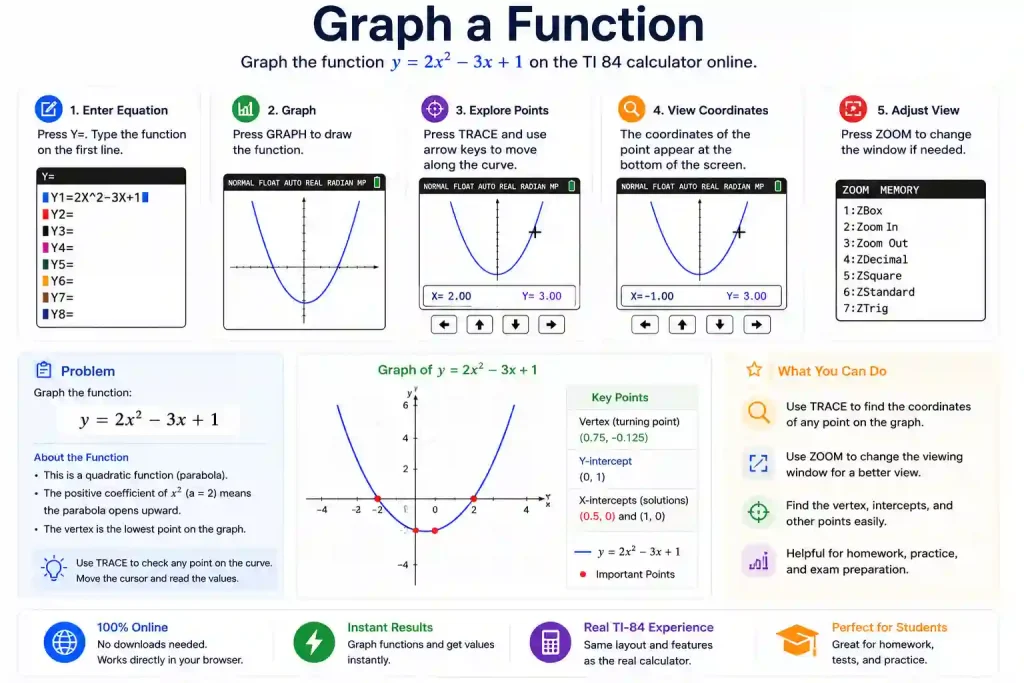
Problem:
y = 2x² − 3x + 1
Steps:
- Press Y=
- Enter: 2X² − 3X + 1
- Press GRAPH
- Use TRACE and arrow keys to explore points on the curve
- Press ZOOM to adjust the view if needed
Example 3: Trigonometry Calculation
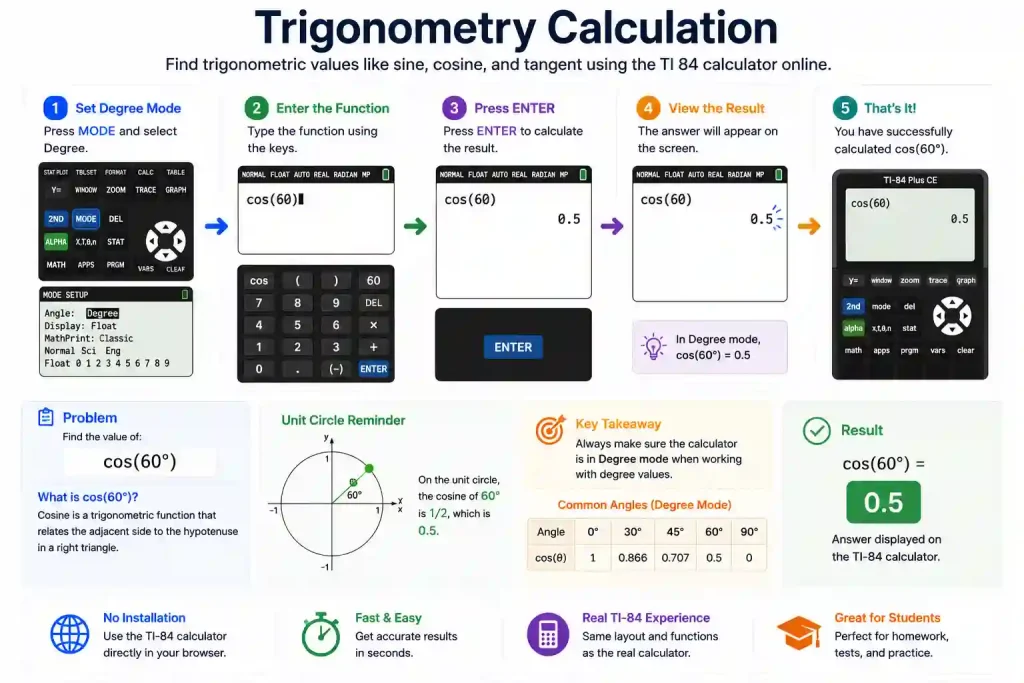
Problem:
Find cos(60°)
Steps:
- Press MODE and set to Degree
- Enter: cos(60)
- Press ENTER
Result: 0.5
Key Features of the TI-84 Calculator Online
The online math calculator offers powerful tools to plot equations, trace curves, zoom, and find intersections. With a familiar TI-84 layout, it works smoothly on laptops, tablets, and phones without downloading it on your device. The key features are explained below:
Works Across Multiple Devices
The calculator can be used on laptops, tablets, and mobile devices directly through a browser. There is no installation or login required, which makes it easier to access whenever needed.
Color Screen
The Calculator provides a high-resolution color screen that makes graphs, curves, and data much easier to read and understand. Different functions and graphs appear in different colors, helping you analyze multiple plots clearly at the same time.
Free and Accessible
Using this calculator is completely free, with no hidden fees, sign-up, or download required. You can access this calculator in the browser anytime on any device, and it is very helpful for students, teachers, and professionals.
Online TI-84 vs Physical TI-84 Plus CE
| Feature | Online TI-84 | Physical TI-84 Plus CE |
| Cost | Free to use | Paid device |
| Access | Works in a browser | Handheld only |
| Graphing Tools | Supported | Supported |
| Statistics Functions | Supported | Supported |
| Installation | No setup required | Physical device required |
| Exam Use | Not allowed in exams | Approved for many exams |
| Battery | Not required | Rechargeable battery |
TI-84 Plus CE, TI-83, TI-84: Comparison Table
| Feature | TI-83 | TI-84 | TI-84 Plus CE (Best Choice for Most Students) |
| Display | Basic black & white screen | Better black & white (faster) | Vibrant full-color, high-resolution |
| Speed & Memory | Slow, basic memory | Faster and more memory | Much faster processor + lots of memory |
| Graphing | Good basic graphs | Better graphs | Smooth, colorful, and enhanced graphs |
| Statistics | Basic stats | More stats options | Full advanced statistics |
| Math Level | Good for basic algebra | Good for algebra & geometry | Best for algebra, geometry, calculus & more |
| Exam Approval (SAT/ACT) | Approved | Approved | Approved |
| Release Year | 1996 | 2004 | 2015 (Newest model) |
| Programming(TI-Basic) | Supported | Supported | Supported ( Python edition available) |
| Best For | Very basic math & graphing | Intermediate students/advanced | Advanced students & professionals |
Who Can Use This TI 84 Calculator Online?
Students: This tool is Perfect for high school and college students studying math, preparing assignments, and engineering courses.

Teachers: Teachers often use this online calculator during live classes to show graphing, functions, and equations.

Professionals: Engineers, data analysts, and technical users who want quick access to a reliable graphing calculator, the TI-84 is the best option for them.

Why Our TI 84 Calculator Online Is a Better Choice
Some students don’t have access to a physical calculator for doing their homework, such as graphing, practicing algebra, and solving equations. So, this is where the online TI-84 Plus & CE calculators come with an easy solution; now you can solve math problems directly in a browser. You can use the TI-84 CE Calculator without installation, and it is free to access from laptops, tablets, and mobile devices.
Common Problems and Their Solutions of the TI 84 Calculator Online
Even with an easy-to-use emulator, some students face small issues while working. The most common problems include graphs not showing properly, getting wrong trigonometry answers, calculation errors, and difficulty reading multiple graphs. Here are quick solutions for the most frequent problems:
- Graph Not Showing: Adjust the zoom or reset window settings to bring the graph into view.
- Wrong Trigonometry Results: Check that the calculator is in the correct Degree or Radian mode.
- Equation Errors: Double-check parentheses, symbols, and spelling before pressing Enter.
- Hard to Read Graphs: Use the TRACE and ZOOM tools to focus on important points and intersections.
- Calculator Freezing or Not Responding: Follow our How to Reset a TI 84 Calculator Online guide for step-by-step reset and troubleshooting instructions.
Frequently Asked Questions
Conclusion
The TI 84 Calculator Online gives students powerful graphing and scientific tools without requiring downloads or a physical device. From solving algebra equations to graphing functions and working on calculus problems, this TI-84 Plus CE simulator helps make math practice simple and accessible. Use the calculator anytime from your browser and start solving problems faster at https://ti84online.com/.